Friday, April 25, 2008

AB Meta: Whats is this thing? but what is that?

AdaptiveBlue announced AB Meta specification in an effort for web pages to expose data about "things" in a standardized way. In this post I will briefly outline in simple terms what this means and propose some conceptual extensions that could provide possibilities for more use-cases.

The purpose of AB Meta specification is to enable web pages (that talk about "thing") to expose their attributes in a standardized way so that programs can understand. For example consider this page from amazon.com: Click Here. It is the landing page for the book titled "Programming Collective Intelligence". Taking a closer look at the source of the page today the following META tags can be found:

<meta name="description" content="Amazon.com: Programming Collective Intelligence:
Building Smart Web 2.0 Applications: Toby Segaran : Books"
/>
<meta name="keywords" content="Toby Segaran ,Programming Collective Intelligence:
Building Smart Web 2.0 Applications,O'Reilly Media, Inc.,
0596529325,Computer Programming,Machine Learning,Computers,Computers -
General Information,Computers - Languages / Programming,Computer Books:
Languages,Artificial Intelligence - General,Programming - General,Computers / Artificial Intelligence,
Computers / Languages / Programming,Computers / Programming / General,Computers/Artificial Intelligence -
General,Data processing,Economic aspects,Information technology,Knowledge management,
Social aspects,Programming - Algorithms,Programming Languages - Python,Internet programming,Web site development"
/>
As you can see the META tag provides metadata about the book in a unstructured way, so for instance bn.com might provide in a different format (or not at all). This is the problem that AB Meta is solves.

AB Meta proposes to leverage META tag and use a standardized format to describe a "thing". A "thing" could be a book, music, cycle, car, movie, etc. This post from their blog provides a good introduction with examples. In a AB Meta enabled amazon.com the meta tags could look like this:

meta name="'object.type'" content="'book'"
meta name="'book.name'" content="Programming Collective Intelligence"
meta name="'book.author'" content="Toby Segaran"
meta name="'book.isbn'" content="0596529325"

etc..

Extensions

Here are few extensions (new attributes) which I believe would worth considering:

OBJECT_TYPE.unique_attr:

The purpose of this attribute is to specify which of the listed attributes universally identify this object uniquely. For books it could be book.isbn and so

book.unique_attr='book.isbn'

Given the growing trend for open data I believe this extension will open up lot of new possibilities.

OBJECT_TYPE.context_attr:

Pages could use this attribute to optionally specify under which context they are talking about the object. For example a user search based on author_name could return a list of books in this case the context is author.

book.context_attr='book.author'

OBJECT_TYPE.ATTRIBUTE_uri:

This is an optional tag that pages can use to publish an URI that talks more about the value of a given attribute. For example for the author of a book it could refer to his wiki page, home page, etc. :

book.author_uri='http://kiwitobes.com/'

Though this might not be very frequently used it is useful tool to present contextual data.

So this answers, what is that?

Conclusion

There is no doubt that the initiative will definitely provide a standardized way for the publishers to expose meaningful contextual data. However the ultimate success of the initiative lies in the adoption by the community. Here the community primarily being online product vendors and services.
I certainly as always welcome any thoughts/comments on the attributes on their implementation.

Sunday, December 16, 2007

Gearing up for Privacy

The issue of Privacy is one of the major concerns in the web today. The most common of such concerns centered around the user data having to live in the cloud with the potential for it to be exposed, stolen or misused by external elements (including the service provider). In this post I share my thoughts on how some of the emerging technologies can help address some of the concerns.

Emerging technologies such as Google Gears, Microsoft Sync Framework and Microsoft Volta provide programming paradigms around online/offline synchronization and an execution context. As you may already know Google Gears opens the possibility of the synchronizing content with browser plugin to provide seamless offline experience of online content. For example services like Google Reader and Zoho Writer leverage this today in their offerings. Microsoft Sync Framework opens the possibility of data synchronization across any device and data format. While Microsoft Volta promises to decoratively allow developers to execute content both online and offline.

As stated earlier the concern of the user data having to live in the cloud can be eliminated by architecting applications to load data locally. The web essentially becoming a platform for software delivery while data may be securely stored locally. The user has the choice of storing data in a medium of his choice, for example in USB drive or local hard-drive or just online. Technology support for encryption capabilities to securely store content should be just a matter of time.

Also the service providers wanting to provide data-sensitive contextual user services/experience may leverage paradigms provided by Volta. This will ensure that any user concerns around Privacy are addressed as well.

As the concept of web as a platform continues to grow so will the user's concern of Privacy and data security. Emergence of technologies and their application in creative ways may help address such inevitable concerns.

UPDATE:

Related:
Google Gears Enabled Sites

Saturday, September 08, 2007

Auto-translate Resource Bundles using Google Translate

Internationalization is one of the common requirements in web applications. One of the challenges faced by a team is the non-availability of translated resource bundles during development (mostly due to logistical reasons). But it is important to test various scenarios during the application development.

In this post I will present a simple idea which utilizes Google Translate to auto-generate translated Java Resource Bundles for the language of choice. Just send a HTTP GET request with the text to be translated to Google Translate URL and read the translated text by parsing the response. In order to translate an entire resource bundle just pass a source bundle (For example, English) and read each property and write to target language resource bundle file.

Here is the URL for translating "welcome" from English to Spanish http://www.google.com/translate_t?langpair=en|es&text=welcome

Here is a snippet of Java code which utilizes Apache Commons HttpClient library :

String url = "http://www.google.com/translate_t? langpair=en|es&text=";
String text = "welcome";

HttpClient client = new HttpClient();
GetMethod getMethod = new GetMethod(url + text);

client.executeMethod(getMethod);
String xml = getMethod.getResponseBodyAsString();
xml = xml.substring(xml.lastIndexOf("<div id=result_box dir=ltr>"));
String translated_text = xml.substring(27, xml.indexOf("</div>"));
System.out.println(translated_text);

Technorati tags: , , ,

Monday, August 27, 2007

mylivesearch.com -- trawl the web

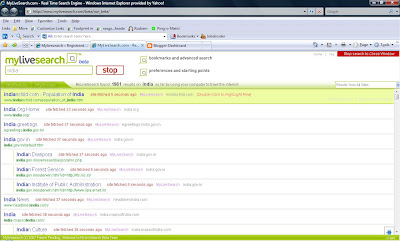
I received the much awaited mylivesearch.com beta release invite few minutes before.

Here is a screen shot

The real-time search is obviously slower than the Google search and also not ranked. Filtering by website feature is pretty helpful.

UPDATE: I just observed everytime you search for something mylivesearch hits the website explicitly. I confirmed this using my web analytics (StatCounter -- used for this blog) to test.

Sunday, August 19, 2007

Google Reader Helper for Firefox

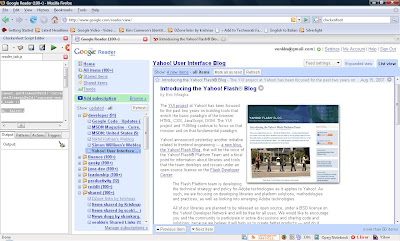
Google Reader is one of the most popular web services and I personally use it everyday. One of the features that I miss using a RSS reader is the ability to view comments. In this post I would share a simple hack to help with this issue and to more importantly serve as a proof-of-concept for possibilities around web application extensions. It is written on a framework called Chickenfoot for Firefox that I recently stumbled upon.

What is Chickenfoot?

Chickenfoot for Firefox is itself a Firefox extension that puts programming environment in the browser's sidebar that allows you to write scripts to manipulate the web pages. Chickenfoot is a superset of JavaScript and puts the user in control of writing quick extensions to web pages. There is a detailed quick start tutorial of Chickenfoot here and the extension can be installed from here.

Google Reader Hack

While reading a post in Google Reader there will be only one expanded view of the post which lives under the <div> with id='current-entry'. This hack leverages this to identify the post that user is currently reading and loads that page in another tab automatically. If you're interested in quickly checking/leaving a comment for the post, then you can switch to the other tab and do so immediately without having to click and wait for it to load.

Once you have installed Chickenfoot, download the script here and open Google Reader on Firefox and start the script. If you're familiar with JavaScript then it should be self-explanatory.

Conclusion

Chickenfoot programming paradigm could be used to enhance web experience for user's convenience. Also the intersection of Chickenfoot with concepts like Programming Collective Intelligence will fuel greater innovation by allowing user to be more in control of the experience.

Resources

Chickenfoot For Firefox

Chickenfoot Blog

Google Reader Helper Script

Technorati tags: , ,

Disqus for techtalk